
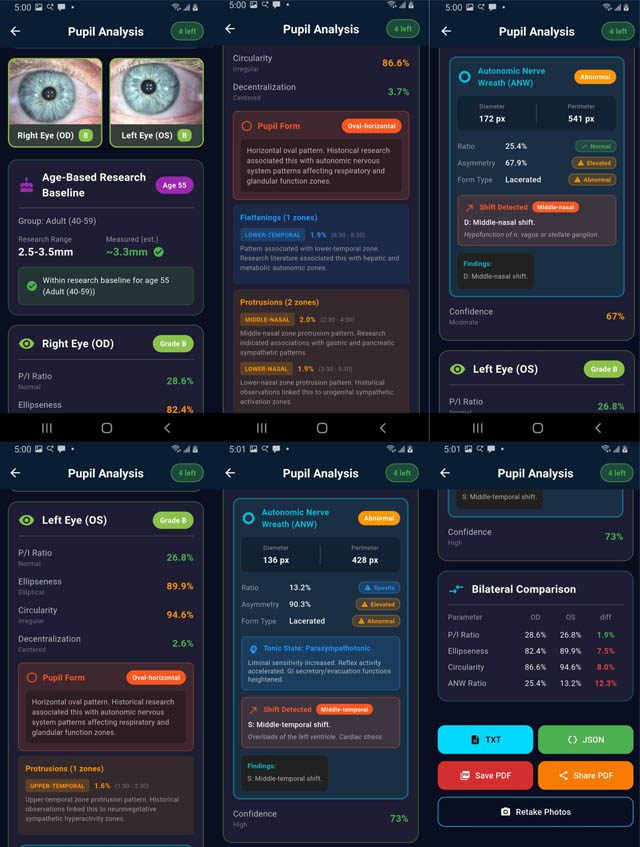
“PupilMetrics Research” and “PupilMetrics Neuro” implements Professor Bryan K. Marcia’s clinical and historical research protocols. Core Algorithm Components
- Iris Detection
- Uses grayscale image processing to locate the iris boundary
- Employs a circle-scoring algorithm that searches for the strongest edge gradient
- Two-pass detection: coarse search followed by fine refinement
- Returns center coordinates, radius, and confidence score
- Pupil Detection
- Searches within the inner portion of the detected iris
- Uses adaptive thresholding based on the darkest 30% of pixels
- Fits an ellipse to the dark region using covariance matrix eigenvalue decomposition
- Extracts boundary points by ray-casting from center outward
- Returns center, major/minor axes, orientation angle, and boundary points
- Pupil Boundary Analysis
- Analyzes 72 boundary points (every 5 degrees) around the pupil edge
- Calculates deviation from the average radius at each clock position
- Groups deviations by clock hour (12 zones)
- Identifies flattenings (inward deviations) and protrusions (outward deviations)
- ANW (Autonomic Nerve Wreath) Detection (Current Phase)
- Searches for gradient changes between pupil edge and mid-iris
- Identifies the collarette boundary
- Calculates ANW ratio relative to iris diameter
- Algorithm updates include:
- SHIFTS (Drawing Out) Which zone the collarette bulges toward Clinical correlation based on Velhover
- CONSTRICTIONS (Drawing In) Frontal zone constricted S: Middle-temporal shift. ← Drawing OUT (protrusion), S: Frontal and basal zones are constricted. ← Drawing IN (narrowing) (ML detected 78% of pathological cases!) Basal zone constricted Combined “Frontal and basal” pattern Both in Same Eye ANW Ratio – Bexel-compatible calculation (25-35% normal) ANW Form Type – Regular, Drawn In, Drawn Out ANW Asymmetry – Per-sector variance detection Zone Constrictions – “Frontal zone constricted” style reporting Pattern Correlation – Compare pupil and ANW findings by sector
Key Measurements Produced
| Parameter | Description | Normal Range |
| P/I Ratio | Pupil diameter as % of iris diameter | 20-30% |
| Ellipseness | Minor/major axis ratio | >95% normal |
| Circularity | How circular the pupil boundary is | >95% normal |
| Decentralization | Pupil center offset from iris center | <5% normal |
| Deformation | Maximum boundary deviation | <5% normal |
| ANW Ratio | Autonomic nerve wreath position | 25-35% normal |
Zone-Specific Organ Associations Each of the 8 pupil zones has specific organ associations for:
- Flattenings – Indicating hypofunction/weakness
- Protrusions – Indicating hyperfunction/irritation
Main Application Features Analysis Screen
- Real-time eye validation before analysis
- Progress indicator during processing
- Displays all measurements with color-coded status
- Shows organ associations for detected anomalies
- Full descriptions for Pupil Form and Decentration Patterns
Enabling the Therapy Modulo Notes** – a structured entry is appended to the Observer Notes field in the format → Clinical conclusion text (if applicable)
Main Application Features
Analysis Screen
Real-time eye validation before analysis
Progress indicator during processing
Displays all measurements with color-coded status
Shows organ associations for detected anomalies
Full descriptions for Pupil Form and Decentration Patterns
Reports Generated
On-Screen Results – Interactive cards with expandable details
TXT Report – Plain text with results section
JSON Report – Structured data for integration/archival
PDF Report – Professional formatted document with images
Enabling the Therapy Modules
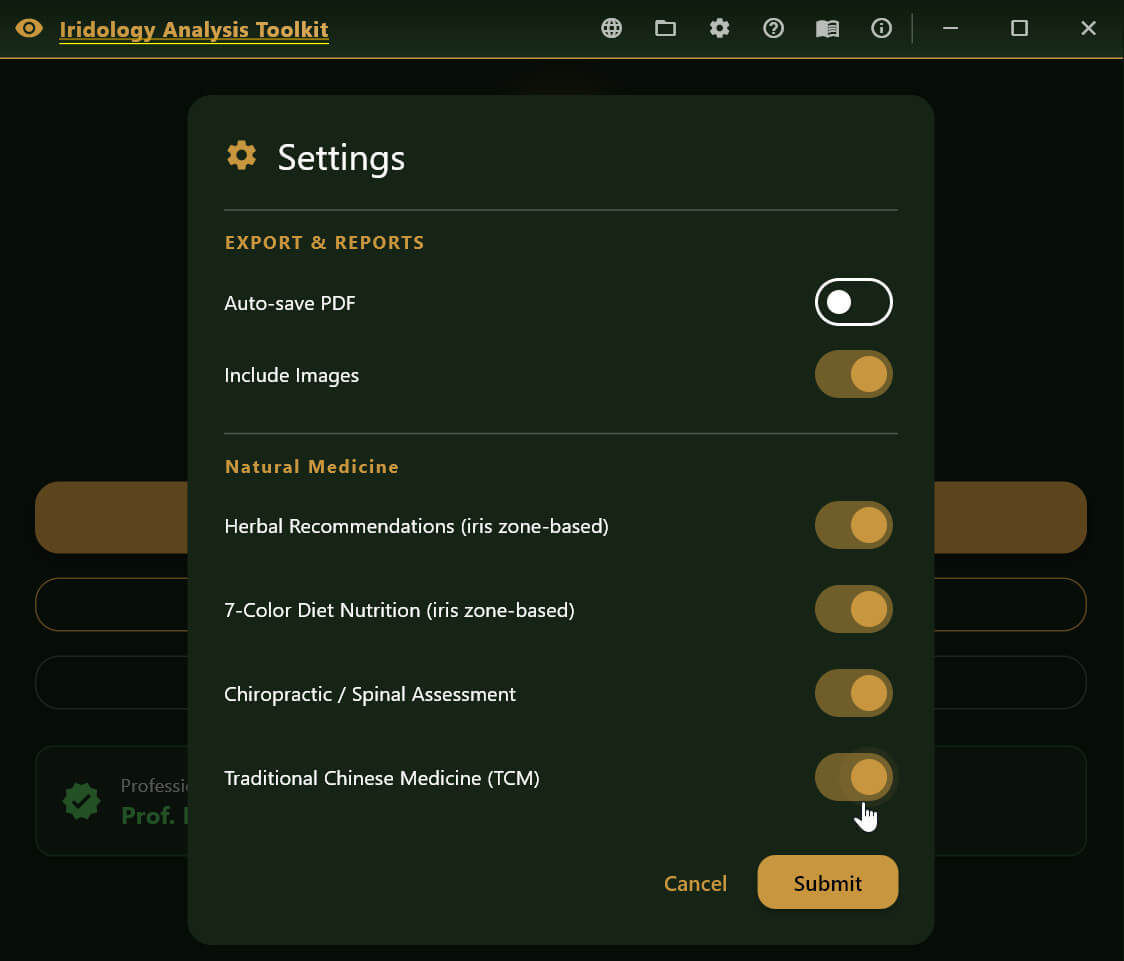
Each module is toggled independently in **Settings**. Disabled modules produce no panel and no PDF section.
| Module | Setting key | Default |
|——–|————-|———|
| Herbal Recommendations | Herbal mode | Off |
| Nutrition Recommendations | Nutrition mode | Off |
| Chiropractic Correlations | Chiropractic mode | Off |
| TCM Correlations | TCM mode | Off |
Toggle any module on, then run a scan. If the analysis finds qualifying iris zone findings, the corresponding panel appears as a tab (or section) on the results screen and is appended to the PDF report.
How Zone Findings Drive the Therapy Panels
All four engines share the same iris zone input pipeline:
**Qualifying finding types**
| Finding type | Badge | Weighting in ranking |
|————–|——-|———————|
| Flattening (lacuna / crypts) | **FLAT** | severity × 1.2 (highest priority) |
| Protrusion (raised sector) | **PROT** | severity × 1.0 |
| ANW shift (ring displacement) | **ANW** | deviation × 0.8 |
Findings are ranked by their weighted score. Each engine caps the number of displayed cards:
– Herbal engine: up to **6 zone cards**
– Nutrition engine: up to **6 zone cards**
– Chiropractic engine: up to **5 zone cards**
– TCM engine: up to **5 zone cards**
If a zone maps to an organ that the database does not cover, that zone is silently skipped. No recommendation card is generated.
**OD / OS labelling**
Every card carries an eye badge (**OD** = right / **OS** = left) so the practitioner knows which eye produced the finding. The iris zone map is mirrored between eyes: for example, the 9-o’clock zone is the right lung (OD) and the left lung (OS); the 3-o’clock zone is the left heart/pericardium (OS) and the right back/pleura (OD).
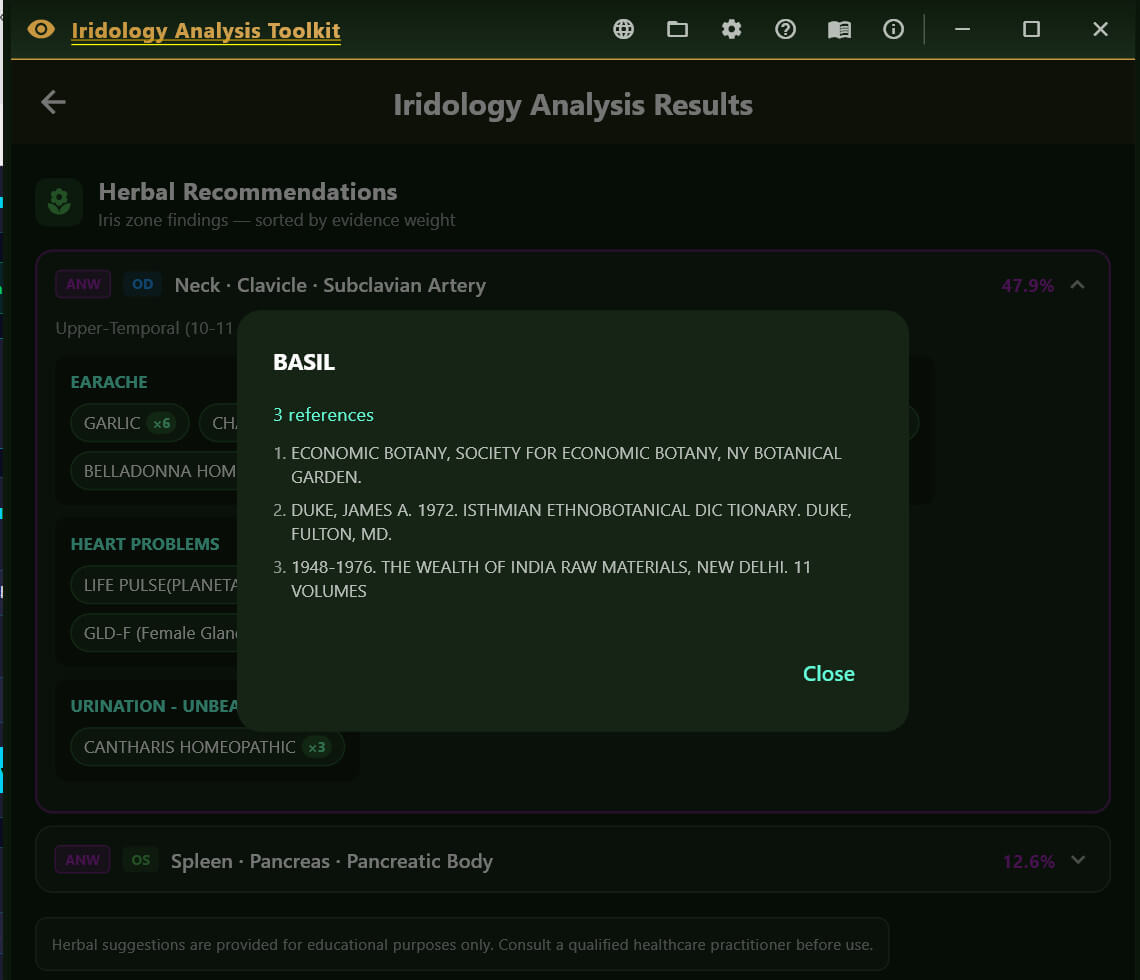
The herbal database (`assets/therapy/herbal_database.json`) is derived from a 5,722-page CNRI knowledge base. It is structured as:
condition name → list of herbs, each with a reference count.
The reference count reflects how many source documents cited that herb for that condition. Higher counts indicate broader cross-reference support.
**How it works**
- The engine takes the organ keywords associated with the triggered iris zone.
- It runs a case-insensitive prefix search across all condition names in the database.
- Up to **4 matching conditions** per zone are returned, each with up to **6 herbs** ranked by reference count.
- Zones are sorted so the highest-severity zone appears first.
**What the panel shows**
Each recommendation card displays:
– **Eye badge** (OD/OS) and **finding badge** (FLAT/PROT/ANW)
– **Zone name** and associated organ system
– **Severity percentage** from the iris analysis
– **Matched conditions** — up to 4 condition names relevant to that organ
– **Herb list** per condition — herb name + reference count shown as a chip; tapping a chip opens the source reference list
– **Evidence note** — total number of references for the top herb
**Disclaimer strip**
A disclaimer is shown at the bottom of every herbal card and is also printed in the PDF. It reminds practitioners that herb–drug interactions exist and that professional supervision is required.
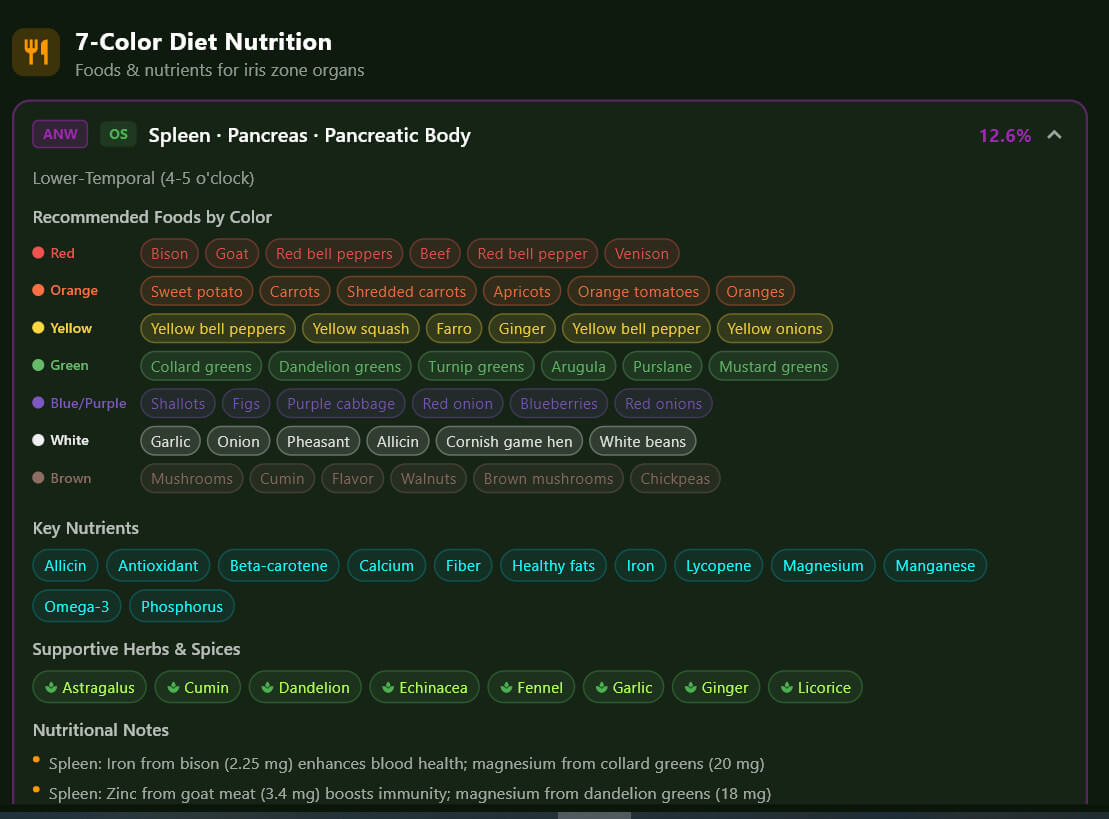
The nutrition database is structured around organ systems, with each organ entry containing:
– **Key nutrients** — vitamins, minerals, and cofactors known to support that organ
– **Color-coded foods** — foods grouped into 7 diet colors (Red, Orange, Yellow, Green, Blue/Purple, White, Brown)
– **Supportive herbs** — culinary and medicinal herbs cross-referenced to that organ
– **Organ support notes** — brief clinical rationale for the dietary approach
**The 7-Color Diet framework**
The color system is derived from the phytonutrient literature: each color group provides a different spectrum of antioxidants, flavonoids, and co-factors. The panel presents color groups as visual chips so practitioners can give patients an intuitive shopping guide.
| Color group | Representative phytonutrients |
|————-|——————————-|
| Red | Lycopene, anthocyanins |
| Orange | Beta-carotene, hesperidin |
| Yellow | Lutein, zeaxanthin |
| Green | Chlorophyll, sulforaphane, folate |
| Blue/Purple | Resveratrol, anthocyanins |
| White | Quercetin, allicin (alliums) |
| Brown | Lignans, beta-glucans (whole grains) |
**When an iris zone maps to multiple organs** (e.g. the lower-basal zone maps to Kidney + Adrenal + Leg), the engine merges the nutrient, food, and herb lists from all matched organs and de-duplicates them. The `matchedOrgans` list on each card shows which organs contributed data.
**What the panel shows**
Each card displays:
– **Zone and organ**, finding type badge, severity
– **Key nutrients** — listed in priority order
– **Color-food grid** — up to 4 foods per color group, displayed as coloured chips
– **Supportive herbs** — small herb chips distinct from the herbal recommendations module
– **Organ support note** — a one-sentence clinical rationale for the dietary focus
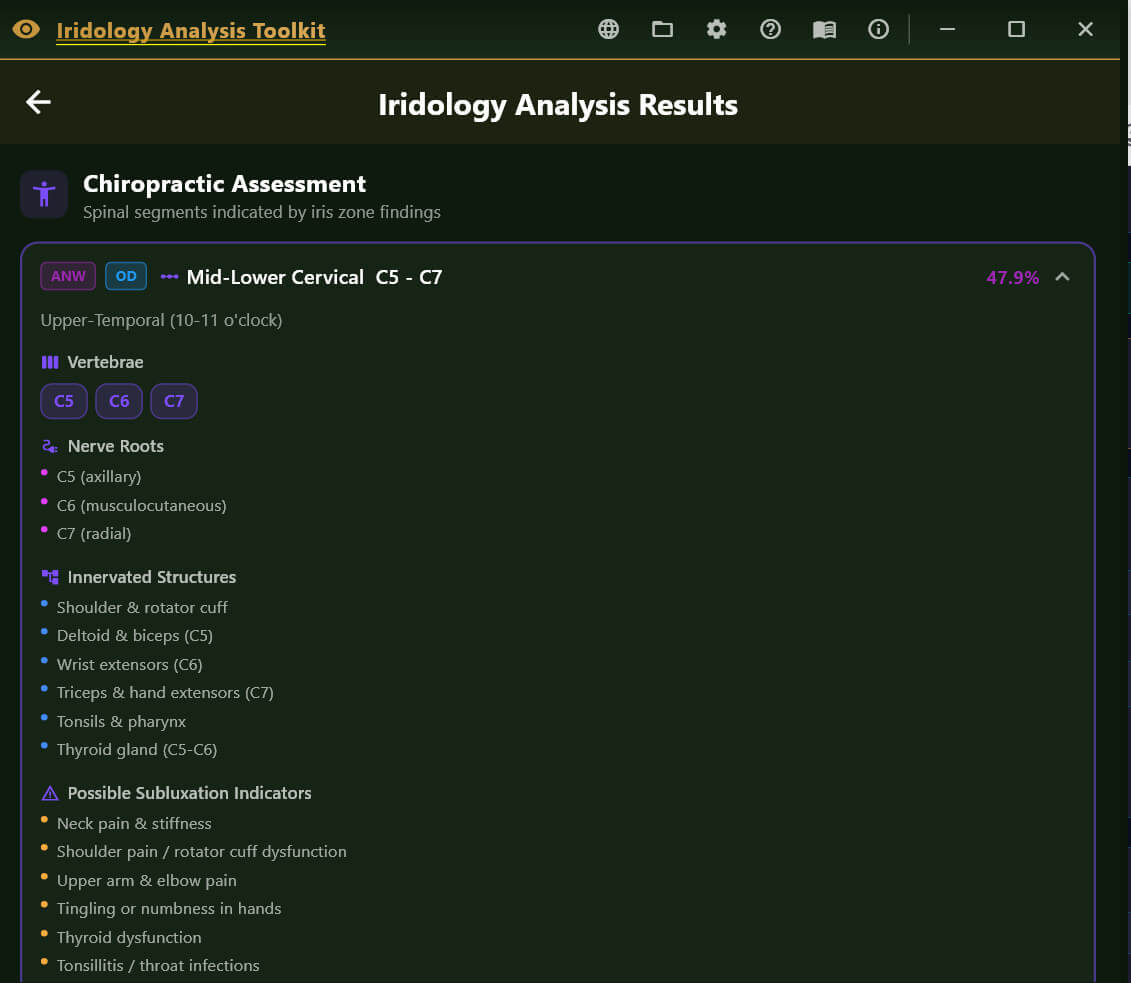
Spinal segment data is compiled directly into the app (no external asset file is loaded at runtime). The zone-to-segment mapping follows the **pupillary-border iridology convention**:
| Iris clock position | Spinal region |
|——————–|—————|
| 12 o’clock (upper-central) | Upper Cervical C1–C4 |
| 10–11 / 1–2 o’clock (upper) | Mid/Lower Cervical C4–C7 |
| 9 / 3 o’clock (middle) | Upper Thoracic T1–T6 |
| 7–8 / 4–5 o’clock (lower) | Lower Thoracic T7–T12 |
| 6 o’clock (lower-basal) | Lumbar / Sacral L1–S3 |
Both eyes map to the **same spinal column** — the spine is midline, so OD and OS findings at the same clock position point to the same vertebral level.
**What the panel shows**
Each spinal segment card displays:
| Section | Contents |
|———|———|
| **Segment label** | e.g. “Upper Cervical C1–C4” |
| **Vertebrae** | Individual vertebrae with common names (e.g. C1 Atlas, C2 Axis) |
| **Nerve roots** | Exiting nerve roots at that level |
| **Innervated structures** | Organs and tissues supplied by those nerves |
| **Subluxation indicators** | Classic symptoms associated with fixation at this level |
| **Affected muscles** | Muscles commonly involved in nerve compromise at this level |
| **Adjusting approach** | Standard chiropractic techniques applicable to the region |
| **Exercises** | Corrective exercises, stretches, and lifestyle recommendations |
| **Postural note** | Ergonomic or postural guidance specific to this spinal region |
**Sources**
Winsor (1921) sympathetic segmental disturbances study; Cleveland Chiropractic College nerve–organ chart; Palmer textbooks; Velchover, Jensen and Angerer references.
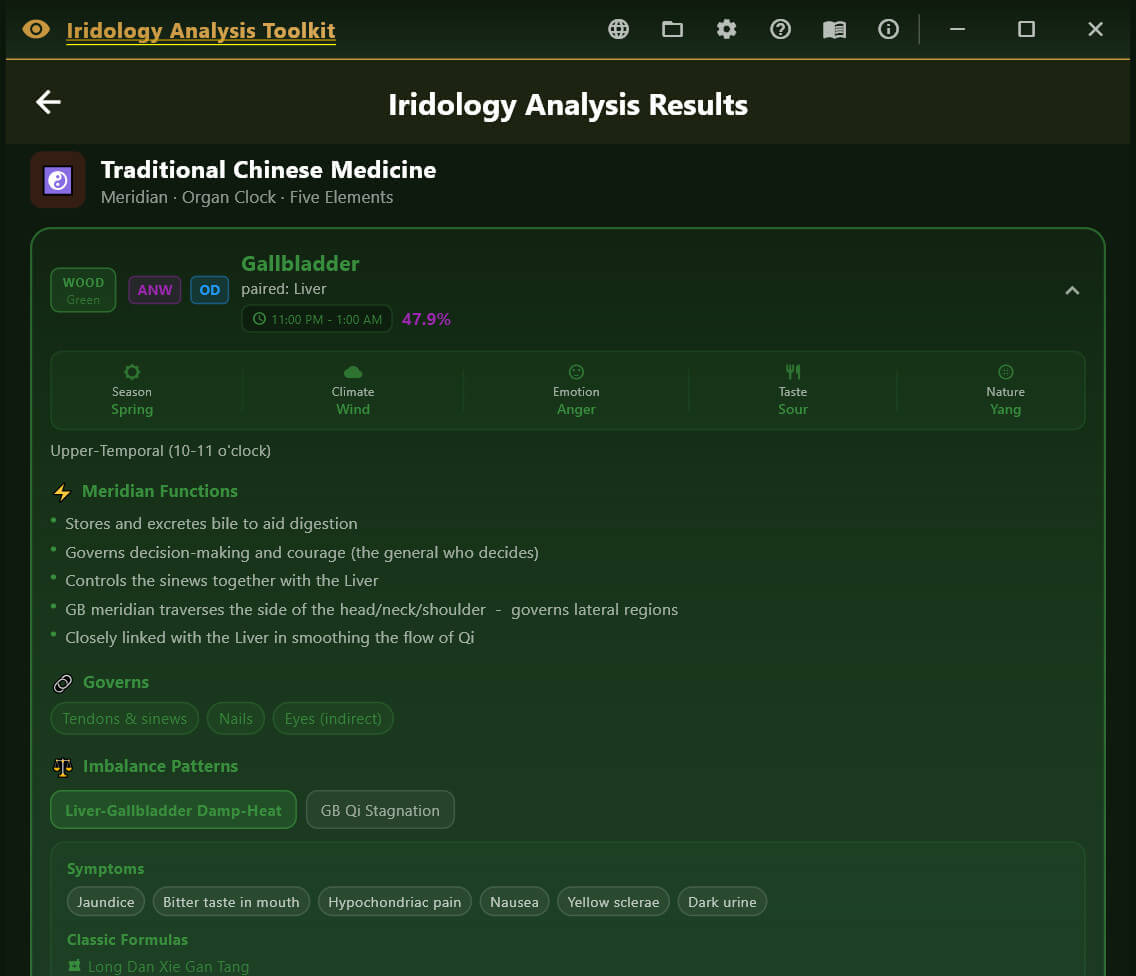
TCM data is compiled into the app (no external file). Each iris zone × eye-side combination maps to a specific TCM organ system entry. The TCM map is eye-side-specific: for example, the middle-temporal zone is the **right lung** in OD and the **left heart / pericardium** in OS – which is the same distinction already present in the iridology iris zone map.
**Five Elements framework**
Each TCM organ belongs to one of the Five Elements (Wu Xing):
| Element | Color | Season | Climate | Taste | Emotion | Sense organ |
|———|——-|——–|———|——-|———|————-|
| **Wood** | Green | Spring | Wind | Sour | Anger / Frustration | Eyes |
| **Fire** | Red | Summer | Heat | Bitter | Joy / Anxiety | Tongue |
| **Earth** | Yellow | Late Summer | Dampness | Sweet | Worry / Overthinking | Mouth |
| **Metal** | White/Grey | Autumn | Dryness | Pungent | Grief / Sadness | Nose |
| **Water** | Blue/Black | Winter | Cold | Salty | Fear / Will-power | Ears |
The element colour is used as the card accent throughout the panel.
**What the panel shows**
Each TCM card displays:
| Section | Contents |
|———|———|
| **Organ pair** | Primary organ + paired organ (e.g. Liver ↔ Gallbladder) |
| **Element bar** | Element name, season, climate, emotion, taste, nature (Yin/Yang) |
| **Meridian clock** | Peak 2-hour energy window (e.g. Liver: 1–3 AM) |
| **Meridian functions** | Key physiological roles in TCM theory |
| **Governs** | Body tissues governed (e.g. Liver governs tendons, nails, and the eyes) |
| **Patterns** | Common TCM imbalance patterns; each pattern lists symptoms, classical herbal formulas, and key acupoints |
| **Acupoints** | Top acupressure/acupuncture points with brief descriptions |
| **Tonifying foodsnalysis session.
Reports Generated
- On-Screen Results – Interactive cards with expandable details
- TXT Report – Plain text with results section
- JSON Report – Structured data for integration/archival
- PDF Report – Professional formatted document with images
Additional Features
- Now available in 14 languages, EN,ES,FR,DE,PT,IT,KR,JA,PL,HI,AR,KR,RU,TR
- Age-based pupil size assessment
- Bilateral comparison between eyes
- Scan history with database storage
Download Iridology Analysis Toolkit from Google Play Store